
Military Retirement
LYNNFIELD LLCFinance
4.7298.00 Reviews
- Version
- 2026.7
- Installs
- 10.00K
- Age Rating
- Everyone
Screenshots
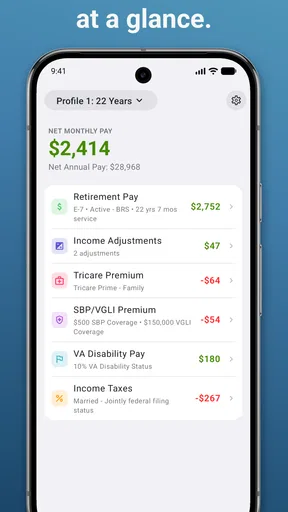
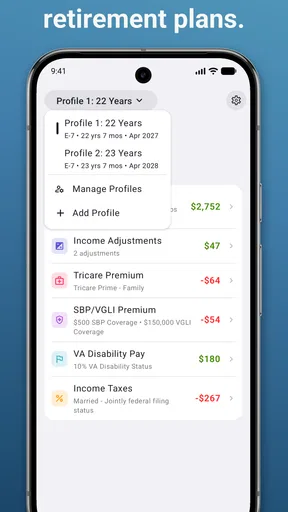
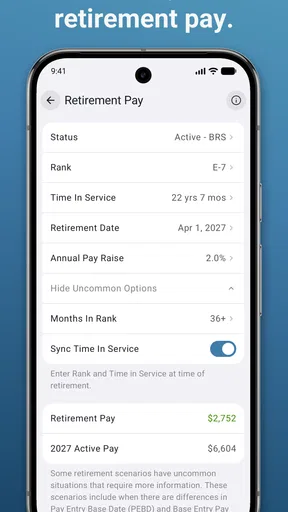
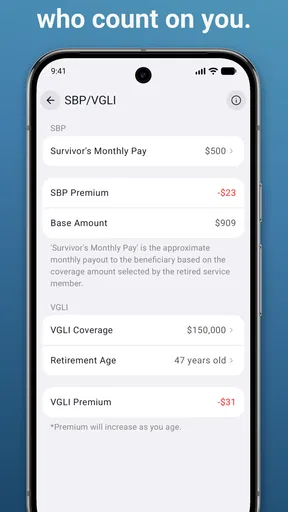
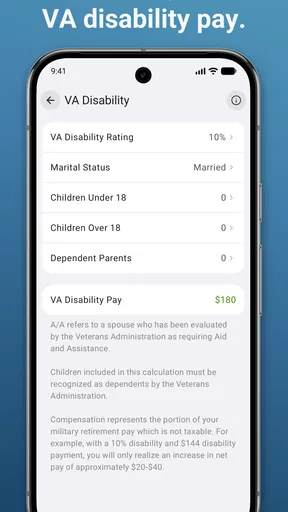
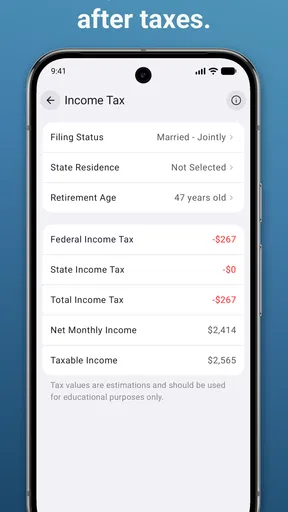
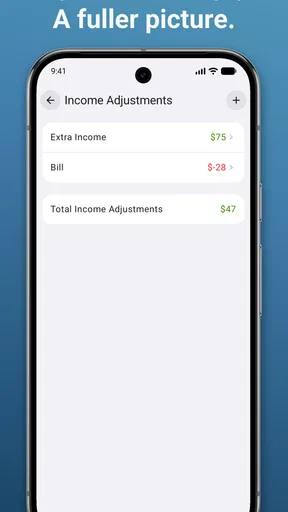
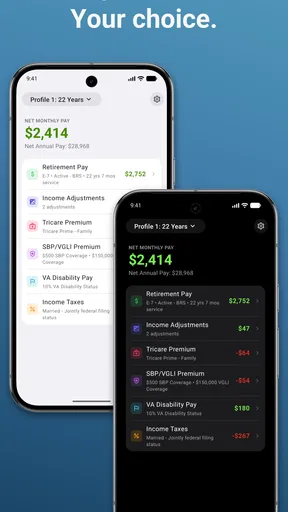
Our Review of Military Retirement
 Analysis by Appyee
I’d treat a military retirement estimate as a starting point for a bigger conversation, not as a final answer about my future income. That is the lens through which I’d use Military Retirement: a focused finance app from LYNNFIELD LLC for exploring how retirement pay might fit into a transition plan. Its purpose is narrower than a general budgeting or investment app, which is useful if I want to think through military retirement specifically, but also means it is not a complete guide to every decision that comes with leaving service.
Reading the estimate and finding a useful next step
The central value of a retirement calculator is not just the number it returns. It is the chance to see how assumptions about service and retirement circumstances shape a planning conversation. I would use the estimate to prepare questions, compare possible timelines, and identify which details I need to verify before making financial commitments. The app’s store summary describes a military retirement pay estimation calculator, so I would keep that estimating role in mind rather than treating an in-app result as an official determination.
That distinction matters in ordinary life. Someone weighing a move, a second career, or a change in household spending can use an estimate to sketch a rough plan, then check the underlying rules with the appropriate official source or a qualified adviser. I would avoid basing a major purchase on a single calculator result. A clear estimate can help me ask better questions; it cannot replace confirming that my personal service record and circumstances have been interpreted correctly.
Readability and navigation for focused planning
A calculator works best when I can concentrate on the inputs and understand what the result is meant to represent. The app’s focused purpose gives it a more direct role than a broad personal-finance dashboard: I can approach it with a retirement-pay question instead of sorting through unrelated spending categories. That can make a short planning session feel manageable, especially when I already know what information I want to examine.
At the same time, a focused tool is only as helpful as my understanding of its assumptions. Before acting on an estimate, I would note the details I entered and keep them with the result, whether in a private planning document or notes for a meeting. That small habit makes it easier to revisit the same scenario later and spot whether a changed assumption—not a change in the underlying rules—is responsible for a different outcome.
Motor and sensory considerations in real use
Retirement planning can involve long forms, unfamiliar terms, and repeated calculations. I would use the app when I have enough time to enter information carefully rather than trying to rush through it between other tasks. If someone finds small on-screen controls or dense financial wording difficult, the sensible approach is to pause, use the device settings and input methods that already work for them, and check each entry before relying on the result.
I would not assume that a finance calculator is automatically comfortable for every ability or device setup. Anyone who depends on a particular screen reader, magnification method, voice control, or alternative input should first check whether the app works well with that setup on their own device. If it does not, a trusted person can help review the inputs, or a desktop resource may be a better way to complete the calculation. The important thing is to preserve the user’s control over sensitive personal details and decisions.
Situational access: when an estimate helps
A realistic use case is a service member discussing a possible retirement timeline with a partner after work. Rather than trying to settle every financial question in one sitting, they can use an estimate to frame a conversation: what income might be relevant, what other household income needs to be considered, and which points require confirmation. The result becomes a prompt for a practical checklist, not a substitute for the rest of the household budget.
This approach is also useful when comparing broad scenarios. I would change one assumption at a time, record what I changed, and avoid comparing results if several inputs shifted together. That makes the exercise more informative: I can see which assumption appears to matter most, then take that specific question to an official source. It is a simple workflow, but it prevents a rough calculator session from turning into false certainty.
For someone who is still far from retirement, the app may be most useful as an occasional planning aid rather than something to check constantly. For someone approaching a decision, it can help organize questions before a benefits appointment or financial-planning discussion. In either case, I would bring the assumptions and questions along, while leaving final eligibility and payment confirmation to the proper channels.
Where it sits among finance alternatives
Compared with a general budgeting app, this tool is more directly relevant to estimating military retirement pay, while a budget app is better for tracking monthly bills, debt, savings, and day-to-day cash flow. Compared with a spreadsheet, a dedicated calculator may feel more approachable for a quick estimate, but a spreadsheet gives me more flexibility to model housing, taxes, civilian income, and changing expenses in one place. Those tools answer different questions, so I would not expect this app alone to replace either one.
I would also separate an estimate from formal benefits guidance. If I need to understand eligibility, confirm how a personal record affects payment, or make a decision with legal or tax consequences, I would seek authoritative help instead of treating a mobile calculation as the last word. The app can help me arrive better prepared, but the more consequential the decision, the more important it is to verify the assumptions independently.
Cost, fit, and the limits of a narrow tool
The app costs $5.99, so I would consider whether a dedicated calculator is worth paying for in my particular planning stage. If I expect to revisit military retirement estimates and value having a focused mobile tool, that price may feel reasonable. If I only need one rough calculation, or already have a trusted official resource and a spreadsheet workflow, I might prefer to use those options instead.
It has a 4.7 average from around 870 ratings, and it has been available since July 10, 2017. Those figures suggest that people have found it useful over time, but they cannot tell me whether its assumptions match my own circumstances or whether it suits my preferred way of interacting with a phone. I would treat user feedback as context, then judge the app by how clearly it supports the specific estimate I need.
It is listed for Everyone and has 10K+ installs, with version 2026.5 and a minimum operating-system requirement of 7.0. Those practical details help me decide whether it is a plausible fit for my device and household, but they do not answer the more personal questions: can I use it comfortably, do I understand what the result means, and will I follow up before making a major decision?
My main reservation is scope. A pay estimate is only one piece of retirement planning, and I would not look to this app to stand in for a full budget, a complete transition plan, or individualized benefits advice. I also would not assume that every personal situation is represented by a calculator’s available inputs. If my circumstances are unusual or the result seems inconsistent with reliable guidance, I would stop and get clarification rather than trying to force the numbers to fit.
In practical terms, the app is best for people who want a focused starting estimate and are comfortable checking what they enter. It is less suitable for someone who needs a complete financial-planning system, wants all retirement questions answered in one place, or cannot use its interface comfortably. People who need hands-on help should pair the calculation with an adviser, benefits office, or another trusted source instead of relying on the app alone.
An informed, inclusive verdict
Military Retirement is a focused finance option for turning a retirement-pay question into a more organized planning discussion. I like the idea of keeping that first estimate separate from the larger work of budgeting and confirming benefits: it gives the calculation a useful role without asking it to do everything. The app is most valuable when I use it deliberately, record my assumptions, and treat the result as a prompt for verification.
For readers who are deciding whether to try it, I would ask three practical questions: Do I need a military retirement estimate rather than a general budget tracker? Am I comfortable entering the relevant details on my device? And will I verify the result before making a significant financial choice? If the answers are yes, the app may be a convenient part of the process. If not, a spreadsheet, official resource, or supported consultation may be a better fit.
So, you've been searching for an app to help manage your military retirement, right? Well, let me introduce you to Military Retirement—an app that's quickly becoming a must-have for anyone planning their transition from active duty to civilian life.
Getting to Know the App
When I first downloaded Military Retirement, I was intrigued by its promise to simplify the retirement process with a personalized approach. Honestly, the app's interface is a breath of fresh air. It’s clean, straightforward, and doesn’t overwhelm you with unnecessary clutter. You’ll find everything you need right on the home screen, from retirement calculators to detailed breakdowns of benefits.
Features That Stand Out
One of the key features that caught my eye is the retirement pay calculator. This tool allows you to input your rank, years of service, and other personal details to estimate your retirement pay accurately. It’s incredibly user-friendly, and the results are laid out in an easy-to-understand format. No more scrambling through endless paperwork or trying to decipher complex military guidelines!
Another feature that I found particularly helpful is the benefits breakdown section. Here, you can get a clear view of what benefits you’re entitled to and how to maximize them. It covers everything from health care options to educational benefits, ensuring you’re fully informed about your potential entitlements.
Personalized Planning
Planning for retirement is never a one-size-fits-all situation, and the app recognizes this by offering personalized planning tools. You can set goals, track your progress, and even receive tailored advice based on your unique circumstances. It’s like having a personal retirement advisor right in your pocket.
Plus, the app sends timely reminders about important deadlines and updates, which means you’re less likely to miss out on crucial benefits.
User Experience and Design
The developers have done a fantastic job with the app’s design. The interface is intuitive, making navigation a breeze even for those who aren’t tech-savvy. The colors are easy on the eyes, and the text is large enough to read without squinting. Overall, it’s an app that feels welcoming rather than daunting.
Let’s not forget about the support community. The app connects you with fellow veterans and retirees, providing a platform where you can share experiences, tips, and advice. It’s a feature that adds a sense of camaraderie, reminding you that you’re not alone in this transition.
Why You Should Consider Military Retirement
At the end of the day, Military Retirement is more than just an app. It’s a comprehensive tool designed to empower you as you plan your future beyond active duty. Whether you’re months away from retirement or just starting to think about it, this app provides a solid foundation for making informed decisions.
So, if you’re looking for a way to simplify your retirement planning, give Military Retirement a try. It might just be the resource you’ve been searching for.
Verdict
Strengths of Military Retirement
- Comprehensive retirement planning tools.
- User-friendly interface with clear navigation.
- Regular updates with new features.
- Supports multiple retirement accounts.
- Includes detailed financial calculators.
Limitations of Military Retirement
- Limited customer support options.
- Requires internet for full functionality.
- Some features locked behind paywall.
- Occasional slow loading times.
- Complex terms may confuse novices.
Similar Picks in This Category
View All
Google Wallet
Google LLC4.3

Airtel: Recharge, Bank & Loans
Airtel4.0

PayPal - Pay, Send, Save
PayPal Mobile4.2

DANA Indonesia Digital Wallet
PT Espay Debit Indonesia Koe4.5

Binance: Buy Bitcoin & Crypto
Binance Inc.4.8

Cash App
Block, Inc.4.7
Frequently Asked Questions
What features does the Military Retirement app offer?
The Military Retirement app provides a comprehensive suite of tools for managing retirement finances. It includes a retirement pay calculator, benefits estimator, and a timeline tracker for milestones. Additionally, users can access resources on VA benefits and health care options, ensuring they have all necessary information for a smooth transition.
Is the Military Retirement app available for both Android and iOS devices?
Yes, the Military Retirement app is available for both Android and iOS platforms. Users can download it from the Google Play Store or Apple App Store. The app is optimized for mobile devices, ensuring a seamless user experience on smartphones and tablets alike.
How accurate is the retirement pay calculator in the app?
The retirement pay calculator in the Military Retirement app is designed to provide highly accurate estimates. It uses up-to-date data and algorithms that consider factors such as rank, years of service, and retirement plans. However, users should verify figures with official military resources for absolute accuracy.
Does the app offer personalized advice or support?
While the Military Retirement app offers a wealth of information and tools, it does not provide personalized advice. Users can access general guidance and resources, but for tailored advice, consulting with a financial advisor or a military benefits counselor is recommended.
Is the Military Retirement app free to use, or are there any hidden costs?
The Military Retirement app is free to download and offers many features at no cost. However, some advanced tools or additional resources may require in-app purchases or subscriptions. Users should review the app's terms and conditions to understand any potential costs fully.
